Lab#RE08-2: Cart Shopping Context with useReducer
ReactJS labs
📘 React JS Lab#RE08-2: Cart Shopping Context with useReducer
This lab starts from Lab#RE08-1: Cart Shopping Context (v0.1), where CartProvider owned a single count with useState.
In v0.2 we’ll replace that number with a real cart: an array of items {id, name, qty, price}, managed with useReducer.
Here’s an overview of what we’ll cover:
- Why
useReducer: a count is easy withuseState; an items array with add, decrement and clear is easier to follow in a reducer. - A pure reducer: one function,
cartReducer, with three actions —add,removeandclear— in its own file. dispatch: consumers no longer callsetCount. They send an action. The provider is the only place that runs the reducer.- The same tree:
CartBadge,ProductandCartSummarystill sit in two branches and still share state throughuseCart. What changes is what the context holds.
By the end of this lab, Add to cart will add a line (or bump its qty), the badge will show the total quantity, and CartSummary will list the items with a total price.
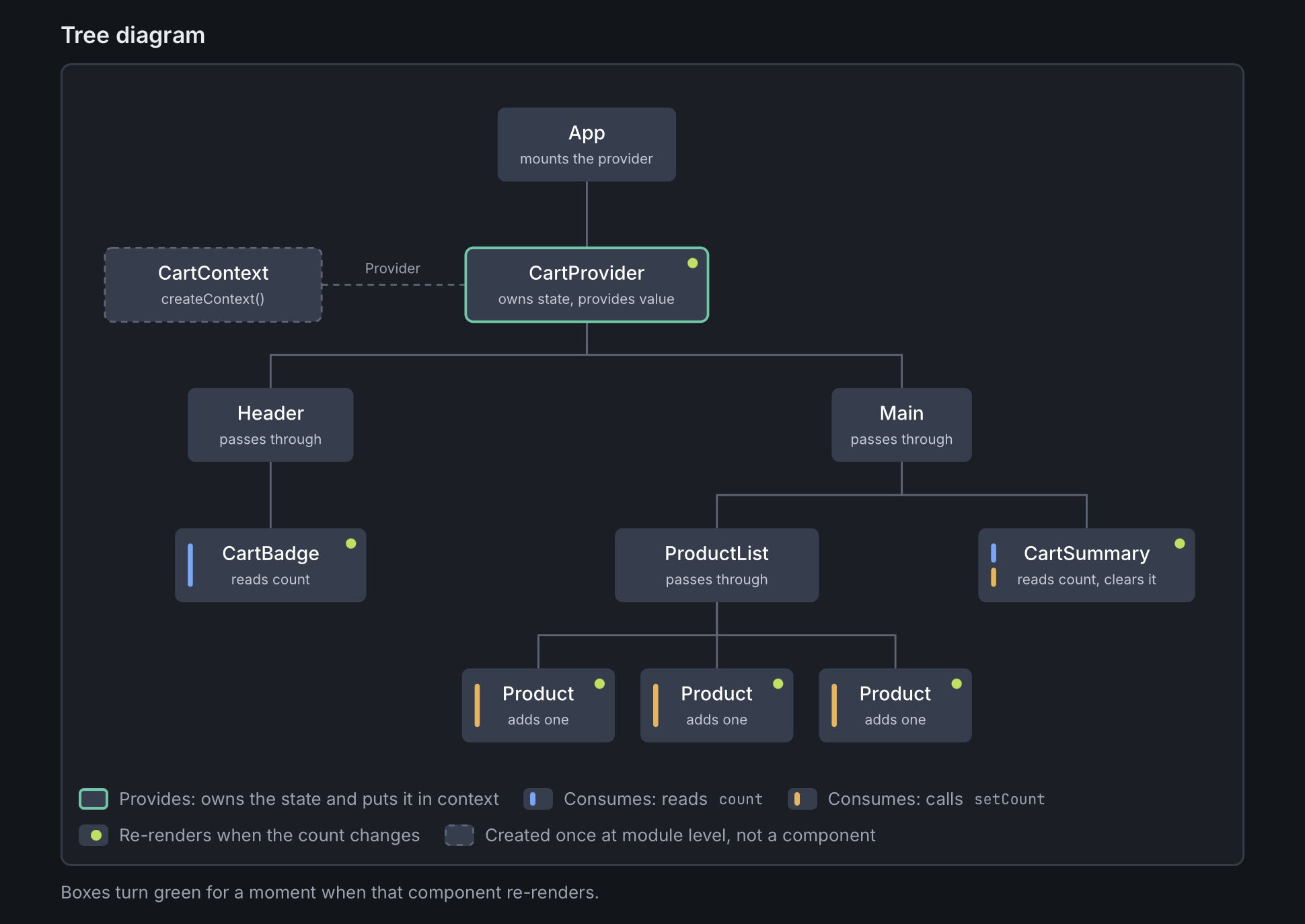
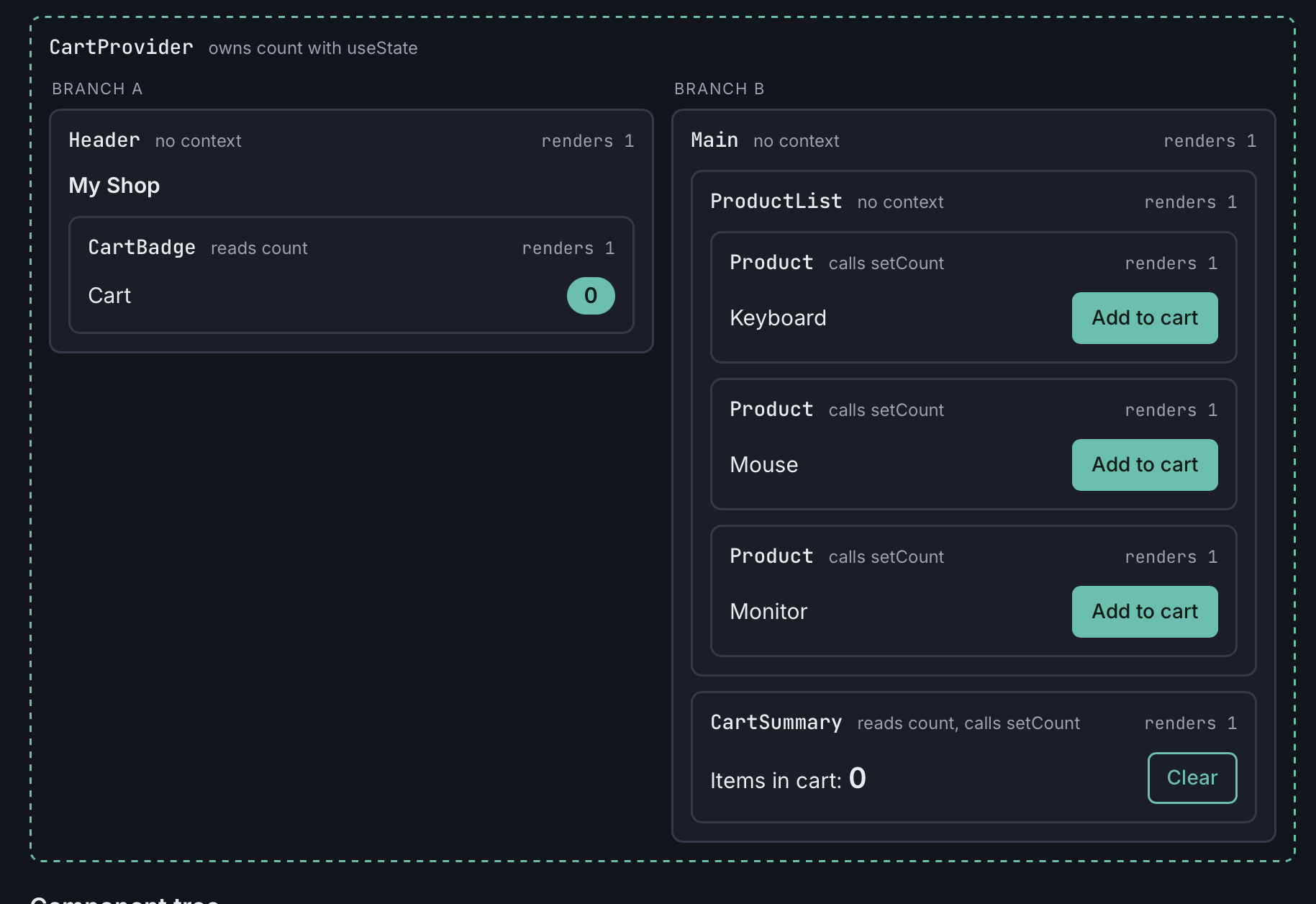
Open the interactive Cart Context Demo (the demo still shows the v0.1 count; use it as a reminder of the two branches). Previous lab: Lab#RE08-1: Cart Shopping Context.
1 References
- Lab#RE08-1: Cart Shopping Context
- React JS: useReducer
- React JS: useContext
- React JS: render cycle (purity and immutability)
useReducer- Extracting State Logic into a Reducer
- GitHub repo: AlbertProfe/cartShoppingContext
2 Starting point: v0.1
In v0.1 the provider looked like this:
src/context/CartContext.jsx (v0.1)
That is enough when the cart is a single number. It gets messy once we want:
- a list of items, not just a count
- a price on each product, and a total in the summary
- Add (new line or
qty + 1), decrement (and drop the line at 0), and Clear
All of those updates belong together. A reducer keeps them in one pure function, instead of several setCount / setItems calls spread across the tree.
The starting commit is cartShoppingContext v0.1. This lab is v0.2.
3 The reducer
The reducer lives in its own file, next to the provider. The state is { items }. Each item is {id, name, qty, price}.
A reducer is a pure function: (state, action) => newState. It does not mutate state, and it does not touch the DOM. See React JS: render cycle.
src/context/cartReducer.js
export const initialCart = { items: [] };

export function cartReducer(state, action) {
  switch (action.type) {
    case "add": {
      const { id, name, price } = action.payload;
      const existing = state.items.find((item) => item.id === id);
      if (existing) {
        return {
          items: state.items.map((item) =>
            item.id === id ? { ...item, qty: item.qty + 1 } : item
          ),
        };
      }
      return {
        items: [...state.items, { id, name, qty: 1, price }],
      };
    }
    case "remove": {
      const { id } = action.payload;
      return {
        items: state.items
          .map((item) =>
            item.id === id ? { ...item, qty: item.qty - 1 } : item
          )
          .filter((item) => item.qty > 0),
      };
    }
    case "clear":
      return { items: [] };
    default:
      return state;
  }
}
Three actions, kept small on purpose:
add: if the product is already in the cart, bumpqty; otherwise append a new line withqty: 1.remove: decrementqty. When it reaches 0, the line disappears.clear: back to an empty array.
Notice the copying: map, the spread { ...item, qty: item.qty + 1 }, and [...state.items, newItem]. We never write item.qty++ or state.items.push(...).
Two small helpers derive the numbers the UI needs. They are also pure:
4 The provider: useReducer and dispatch
CartProvider still owns the state and still wraps both branches. It now calls useReducer and puts { items, dispatch } on the context. There is no setCount any more.
src/context/CartContext.jsx
import { createContext, useReducer } from "react";
import { cartReducer, initialCart } from "./cartReducer";

export const CartContext = createContext();

export function CartProvider({ children }) {
  const [state, dispatch] = useReducer(cartReducer, initialCart);
  return (
    <CartContext.Provider value={{ items: state.items, dispatch }}>
      {children}
    </CartContext.Provider>
  );
}
dispatch is stable. Consumers send { type, payload }. Only the reducer decides how the next items array looks.
useCart does not change: it still returns whatever the provider put on the context.
5 Updated consumers
Header, Main and App stay as they were in v0.1. They still do not touch the context. The products now have a price. The shop still has only Keyboard and Mouse.
src/ProductList/ProductList.jsx
Product dispatches add with the product data. It does not read the cart.
src/Product/Product.jsx
CartBadge shows the total quantity (Keyboard × 2 plus Mouse × 1 is 3), not the number of lines.
src/CartBadge/CartBadge.jsx
CartSummary lists each line with its qty and line price, shows the total, and can decrement a line or Clear the cart.
src/CartSummary/CartSummary.jsx
import { useCart } from "../hooks/useCart";
import { cartTotal } from "../context/cartReducer";

export function CartSummary() {
  const { items, dispatch } = useCart();
  const total = cartTotal(items);

  return (
    <div>
      <h2>Cart</h2>
      {items.length === 0 ? (
        <p>The cart is empty.</p>
      ) : (
        <>
          <ul>
            {items.map((item) => (
              <li key={item.id}>
                {item.name} × {item.qty} — {item.qty * item.price} €{" "}
                <button
                  onClick={() =>
                    dispatch({ type: "remove", payload: { id: item.id } })
                  }
                >
                  −
                </button>
              </li>
            ))}
          </ul>
          <p>Total: {total} €</p>
          <button onClick={() => dispatch({ type: "clear" })}>Clear</button>
        </>
      )}
    </div>
  );
}
6 What to notice
- One
dispatch.Productadds,CartSummarydecrements or clears, and nobody else needs a custom setter. The next state always comes fromcartReducer. - The same consumers still re-render.
CartBadge, everyProduct, andCartSummarysubscribe to the context. Whenitemschange, they all render again — even aProductthat only usesdispatch. That is the same idea as in Lab#RE08-1, and it is still why bigger apps split contexts. - The reducer is pure and immutable. It returns a new
{ items }object. It never mutates the previous state. That is what React expects when it decides whether to re-render: see React JS: render cycle.
7 Next features
These later steps are not in this version of the repo:
- A theme toggle (dark / light) read by many components. That would be its own
ThemeContext, not more fields on the cart. - A logged-in user shown in the navbar and used by a profile page. Again, a separate
UserContext.
8 Code
| Code Version | Commit | Folder-Tree | Output |
|---|---|---|---|
| GitHub code v0.1 | cart context with useState and a count (Lab#RE08-1) |
repo at v0.1 | tree diagram, playground render, interactive demo |
| GitHub code v0.2 | items array {id, name, qty, price} with useReducer: add, remove, clear |
repo at v0.2 |