Java Standard Edition: JVM
Java Virtual Machine
1 Introduction
📘 Java JVM
The Java Virtual Machine (JVM) is a process virtual machine that executes Java bytecode. It is the cornerstone of the Java platform, enabling Java programs to run on any device or operating system that has a compatible JVM implementation.
When we write a simple “Hello, World!” program, the size of the final executable (or packaged runtime) varies enormously depending on the language. This difference reveals a fundamental trade-off between control, safety, productivity, and runtime overhead.
Here is a typical ranking of compiled (or packaged) “Hello World” binary sizes (builds), from smallest to largest:
| Language / Runtime | Approximate Size | Category |
|---|---|---|
| Assembly | ~300 Bytes | Raw machine code |
| Zig | ~5 KB | Systems language, minimal runtime |
| C | ~15 KB | Classic compiled language |
| C++ | ~18 KB | Compiled + some standard library |
| Nim | ~150 KB | Compiled with GC |
| Rust | ~300 KB | Memory-safe systems language |
| Crystal | ~800 KB | Ruby-like syntax with GC |
| Go | ~1.2 MB | Statically linked runtime |
| C# | ~2 MB | Managed language (AOT/JIT) |
| Swift | ~2.5 MB | Managed + rich core libraries |
| Dart | ~5 MB | Managed runtime |
| Python | ~12 MB | Interpreter + standard library |
| Java | ~14 MB | Full managed runtime (JVM) |
| Bun | ~55 MB | JavaScript runtime packaged |
| Deno | ~70 MB | JavaScript runtime packaged |
| Node.js | ~85 MB | Full JavaScript engine packaged |
What this table tells us
- Languages at the top (
Assembly,Zig,C) produce almost pure machine code with almost no extra runtime. - Languages in the middle (
Rust,Go,Nim) include useful features (memory safety, garbage collection, concurrency) and therefore ship a larger runtime. - Languages at the bottom (
Java,Python,Node.js, etc.) include a complete execution engine, standard libraries, garbage collector, and often an entirevirtual machine. The price of high productivity and portability is a significantly larger binary or distribution size.
Javasits in the “managed runtime” group. The component responsible for this managed execution model is the Java Virtual Machine (JVM).
2 Compiled “Hello World” Binary Size
2.1 Tiny end (native, minimal runtime)
Assembly (~300 bytes): You write the exact machine instructions (syscalls for write + exit on Linux, or the Windows equivalents). No compiler runtime, no libraries, no safety checks. Can be hand-tuned even smaller (under 200 bytes in extreme cases).
Zig (~5 KB): Designed for small, controllable binaries. Excellent size-focused modes (
ReleaseSmall), optional freestanding/no-std style, and strong dead-code elimination. Often beats or matches carefully tuned C.C (~15 KB) / C++ (~18 KB): Classic compiled languages. With a small libc (or musl) + stripping + size optimization they stay tiny. C++ is a bit larger because of name mangling, exception tables, or libstdc++ bits even for simple programs. Dynamic linking makes them even smaller on disk (the C library is shared), but the list usually measures the self-contained case.
2.2 Small-to-medium compiled languages
Nim (~150 KB): Compiles to C (or C++/JS), so it inherits a decent amount of the C runtime plus its own GC and standard library. Still relatively lean when optimized.
Rust (~300 KB): Memory safety, panic/unwind support, monomorphization of generics, and a richer standard library add weight. Default release builds include more than pure C; aggressive LTO + strip +
opt-level=zcan shrink it a lot, but the “canonical” size sits higher.Crystal (~800 KB): Ruby-like syntax with a GC and richer runtime. More overhead than Rust/Nim for the same “hello”.
2.3 Languages with runtimes
Languages with substantial runtimes or static linking of the whole environment
Go (~1.2 MB): The Go runtime (garbage collector, goroutine scheduler, reflection, etc.) is statically linked into every binary by default. This is deliberate: single-file deployment with almost no external dependencies. You can shave size with build flags (
-ldflags="-s -w"), but the runtime is still there.C# (~2 MB), Swift (~2.5 MB), Dart (~5 MB): Ahead-of-time (AOT) or native compilation still pulls in a sizable core library / runtime (GC, reflection, standard collections, platform interop). Swift especially tends to include core framework pieces.
2.4 Interpreted / VM / full-runtime packaging
Python (~12 MB), Java (~14 MB): These are usually the size of a minimal self-contained distribution or AOT-compiled image (GraalVM native image for Java, or a frozen Python interpreter + stdlib). The “binary” includes the entire virtual machine / interpreter.
Bun (~55 MB), Deno (~70 MB), Node.js (~85 MB): These package the full JavaScript runtime (V8 or equivalent engine, standard library, module system, etc.) into a single executable. Even a one-line “hello” carries the entire JS engine. Tools exist to produce smaller native JS binaries, but the mainstream “compile/package to binary” path is large.
2.5 Key takeaways
Lower-level / systems languages give you fine control and tiny binaries when you want them.
Higher-level languages trade binary size for productivity, safety, concurrency primitives, garbage collection, rich standard libraries, and easier deployment (especially the static single-binary ones like Go).
Static linking makes deployment trivial (“just copy the file”) at the cost of size; dynamic linking keeps the on-disk executable smaller but requires the right shared libraries on the target system.
Most of these sizes can be reduced with effort (strip symbols, LTO, size optimization, no-std/freestanding modes, alternative linkers, UPX compression, etc.). The list reflects relatively normal or “canonical” builds rather than the absolute smallest possible art projects.
In short: the jump from a few hundred bytes to tens of megabytes is almost entirely the cost of the language’s runtime and the features it provides out of the box. For a real program the relative differences often shrink, but the “Hello World” ranking remains a useful illustration of the spectrum.
3 What Is a Virtual Machine?
The term “virtual machine” is used for two quite different things in computing. Understanding the distinction is essential.
System (Hardware) Virtual Machines:
Examples: Oracle VirtualBox, VMware, Hyper-V, QEMU/KVM.
These create a complete virtual computer: - Fake CPU - Fake memory - Fake disk - Fake network card - Fake BIOS
You can install a full operating system (Windows, Linux, etc.) inside them. They are heavy and emulate an entire machine.
3.1 Process (Application) Virtual Machines
Examples: JVM, .NET CLR, Python interpreter (to some extent), Lua VM, WebAssembly engines.
These do not emulate a whole computer. They only provide a specialized runtime environment for one family of programs. They run as ordinary processes on top of a real operating system.
The JVM belongs to the second category.
| Aspect | System VM (VirtualBox) | Process VM (JVM) |
|---|---|---|
| What it emulates | Entire computer | Runtime environment for one language |
| What runs inside | Full guest operating system | Only programs written for that VM |
| Resource usage | Heavy | Much lighter |
| Goal | Run another complete OS | Run programs of a specific language |
| Hardware access | Emulated or virtualized hardware | Real host OS + hardware via system calls |
4 Why Is It Called a “Virtual Machine”?
Even though the JVM is not a full system emulator like VirtualBox, the name is technically accurate for historical and architectural reasons.
A real CPU has: - An instruction set - Registers - A stack - Memory organization - Execution rules
The JVM defines exactly the same concepts, but in software:
- Its own
instructionset → Java bytecode - Its own
stackandlocal variables - Its own
memorymodel (heap, method area, etc.) - Its own
rulesfor class loading, exception handling, threading, and security
When a Java program runs, it is executing instructions on this abstract machine, not directly on the physical CPU. The real CPU only appears later, when the JVM translates bytecode into native machine code (via an interpreter or a Just-In-Time compiler).
“Virtual” simply means the machine is not real hardware — it exists as a specification and as software that implements that specification.
This design was deliberate. In the early 1990s the creators of Java wanted a single compiled program to run on any device that possessed an implementation of this abstract machine. Calling it a virtual machine was the natural and precise term.
5 Precise Definition of the JVM
Best technical definition:
The
Java Virtual Machine (JVM)is a process virtual machine (also called an application virtual machine or managed runtime) that executes Java bytecode.
A more practical description:
The
JVMis a managed runtime engine that comes with a rich set of supporting services: garbage collection, security, threading, dynamic class loading, the standard libraries, and more.
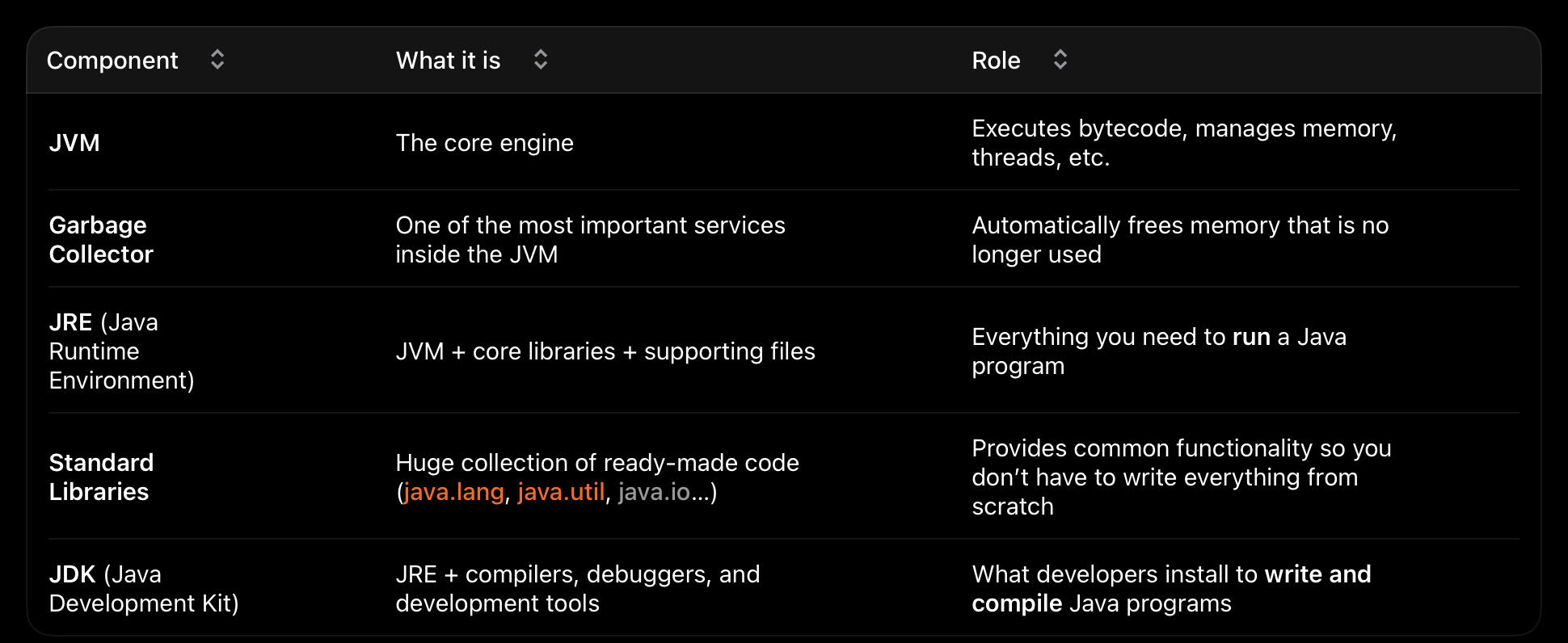
5.1 Relationship Between the Main Components
| Component | What it is | Purpose |
|---|---|---|
| JVM | The core execution engine | Runs bytecode, manages memory, threads, etc. |
| Garbage Collector | Service inside the JVM | Automatically reclaims unused memory |
| JRE | JVM + core libraries + supporting files | Everything needed to run Java programs |
| Standard Libraries | Large collection of ready-made classes | Common functionality (I/O, collections, etc.) |
| JDK | JRE + compilers, debuggers, and tools | Everything needed to develop Java programs |
6 How the JVM Executes Code
From Source to Bytecode (Ahead of Time):
We write
Javasource code and compile it withjavac(or a build tool). The result is one or more.classfiles containing platform-independent bytecode. At this stage nothing is running yet.
Execution Model for Small and Large Programs:
Modern JVMs (HotSpot and its derivatives) use a mixed-mode approach:
- Class loading – Classes are loaded lazily, only when first needed.
- Interpretation – At the beginning the
JVMreads bytecode instruction by instruction and executes it. This is relatively slow but starts immediately. - Profiling – The JVM continuously observes which methods are executed most frequently (“hot” methods).
- Just-In-Time (JIT) compilation – Hot methods are compiled in the background into highly optimized native machine code for the real CPU.
- Native execution – Once a method has been
JIT-compiled, subsequent calls run at near-native speed. - Tiered compilation – Very hot methods can be re-compiled later with even more aggressive optimizations.
Important consequences for a large application (for example 10 000 lines and 20 classes):
- The entire program is never compiled to native code in one go.
- Compilation happens per method (or small groups of methods).
- Rarely used methods may stay interpreted forever.
- Frequently executed methods become native code and run much faster after a warm-up period.
- Class loading, garbage collection, and JIT compilation all happen concurrently with normal program execution.
6.1 Concrete Example – Three Layers
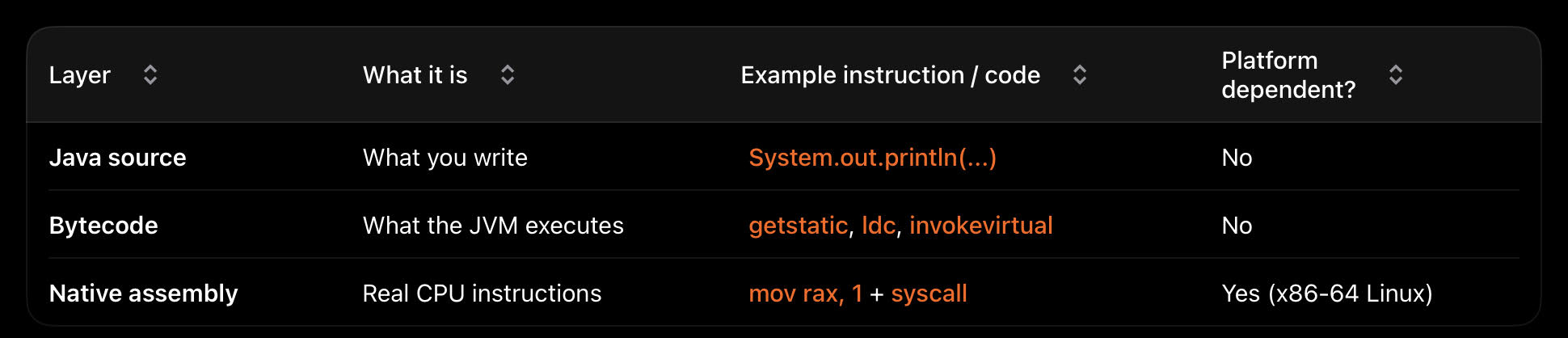
Java source
public class Hello {
    public static void main(String[] args) {
        System.out.println("Hello, World!");
    }
}
Bytecode (simplified view obtained with javap -c)
0: getstatic     #7   // Field java/lang/System.out
3: ldc           #13  // String Hello, World!
5: invokevirtual #15  // Method println
8: return
Approximate native x86-64 assembly (conceptual result after JIT or a similar translation on Linux)
mov     rax, 1          ; sys_write
mov     rdi, 1          ; stdout
mov     rsi, msg        ; address of "Hello, World!\n"
mov     rdx, 14         ; length
syscall

mov     rax, 60         ; sys_exit
xor     rdi, rdi
syscall
The JVM sits in the middle: it understands the bytecode and eventually produces (or interprets into) real CPU instructions.
7 Mental Model of the JVM
        Your Java source code
              ↓
         javac compiler
              ↓
    Java bytecode (.class / .jar)          ← platform-independent
              ↓
             JVM
   ┌──────────────────────────────┐
   │  Interpreter + JIT compiler  │
   │  Garbage Collector           │
   │  Class loaders               │
   │  Security & threading        │
   │  Standard libraries          │
   └──────────────────────────────┘
              ↓
 Native machine code + OS system calls
              ↓
     Real operating system kernel
              ↓
Physical hardware (CPU, memory, disk…)
8 Key Takeaways
- The JVM is not a full system virtual machine like VirtualBox. It is a process virtual machine specialized for running Java bytecode.
- It is best described as a managed runtime engine that provides automatic memory management, safety, portability, and a rich set of libraries.
- The name
“virtual machine”is justified because theJVMdefines its ownabstract computer: - instruction set, - memory model, - execution rules. Executionis a hybrid of interpretation andJust-In-Time compilation: cold code stays interpreted, hot code becomes highly optimized native machine code.- The relatively large size of a
Java“Hello World” distribution is the visible cost of this rich managed environment — the same cost that givesJavaits famous“write once, run anywhere”property and its strong productivity features.
This combination of
portability,safety,performance(after warm-up), and amatureecosystem is the reason theJVMremains one of the most important runtime platforms in software engineering.