PRA#02: Java UML + Implementation + H2 Data Population
- Project Repository
v_1.0
Summary
This laboratory reinforces object-oriented modeling and Java implementation skills while introducing basic server-side persistence concepts within the MF0492_3 Programació web en l’entorn servidor module.
Students will extend the apartment predictor domain model by designing an enhanced UML class diagram, implementing new classes and relationships, and — in a single well-structured commit — populating an H2 in-memory database (or local, if prefer) with realistic fake data using Spring Boot, Spring Data JPA, and a data initializer/loader.
The exercise emphasizes multi-level inheritance, composition/aggregation, JPA entity mapping, repository usage, and CommandLineRunner / @Component populator data seeding techniques.
Reference Commit d4c9885
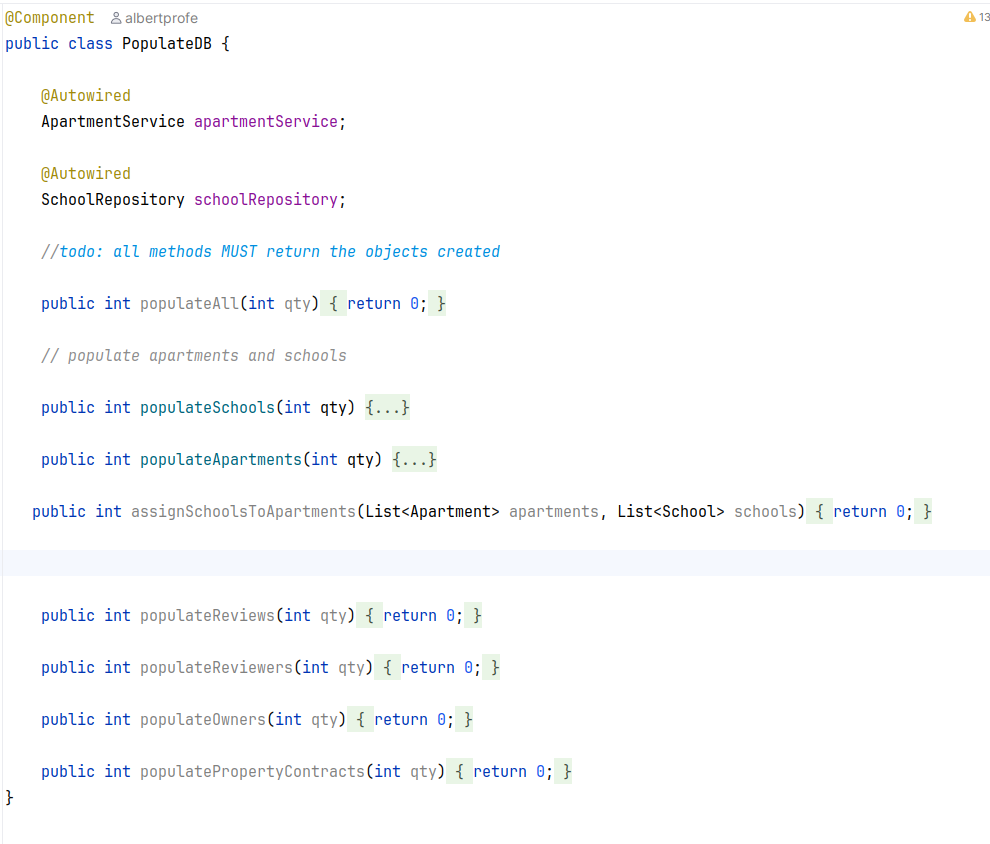
Reference commit d4c9885 that populates the database in one go:
Students should aim for a similar clean, atomic commit that adds entities, repositories, and fake data initialization logic.
Other references:
Inherence storing at H2 DB
Inheritance Strategy Decision
In JPA, when designing an inheritance hierarchy (such as
Person → Owner, ReviewerorProperty → Apartment, House, Townhouse), you must choose an inheritance mapping strategy.
For this lab you will select exactly one of the two following strategies and justify your choice in the documentation (/docs/LAB02.md).
Option A – @MappedSuperclass
- https://albertprofe.dev/images/springboot/inherence-jpa-mapped-superclass.png
Use @MappedSuperclass on the parent class (e.g. Person or ResidentialProperty).
This strategy:
- Does not create a table for the superclass
- Shares common fields/mappings (getters, annotations like
@Column,@Temporal) among all subclasses
- Each concrete subclass gets its own independent table containing both inherited + specific fields
- Advantages: simple queries, no JOINs needed, clean schema
- Disadvantages: duplicated columns across tables, no polymorphic queries on superclass type
Option B – TABLE_PER_CLASS (InheritanceType.TABLE_PER_CLASS)
Use @Inheritance(strategy = InheritanceType.TABLE_PER_CLASS) on the abstract/root entity.
This strategy:
- Creates a separate table for each concrete class
- Each table contains all fields (inherited + own)
- Allows polymorphic queries and references to the superclass type
- Advantages: full polymorphism support, clean OO design
- Disadvantages: poor performance with deep hierarchies (UNION queries), difficult schema evolution, not recommended by most teams for large systems
Tasks
Starting point:
- From commit d4c9885 follow the path craeted by the pseudocode.
Objectives
- Practice domain modeling with UML and multi-level inheritance
- Correctly map entities using JPA annotations (
@Entity,@Id,@GeneratedValue,@Inheritance,@ManyToOne, etc.) - Seed an H2 database with realistic fake data using
CommandLineRunnerorDataLoaderchoosing the right approach. - Implement Spring Data JPA repositories
- Create REST controllers with basic CRUD
- @Service is no need for this version but we value it.
- Verify functionality via Postman collections
Summary tasks
Detailed tasks
- Define and document the Product Goal
Write 1–2 clear paragraphs explaining the business & technical purpose of this backend module
Place it in
README.mdor/docs/LAB02.mdat the topExample aspects to cover: supported property types, users/owners, future frontend integration, why inheritance, value of pre-populated data
- Create / enhance the UML class diagram
- Use mermaid syntax (place in README or
/docs/LAB02-uml.md)
- Implement all entities with JPA & inheritance
Use
@Entity,@Id,@GeneratedValue(strategy = GenerationType.IDENTITY)orUUIDas you prefer- Implement inheritance for
Person→ at least two subclasses (Owner,Reviewer) - Example:
Personwithid,fullName,email,phone - Use
@ManyToOne,@OneToMany,@ElementCollectionwhere appropriate
- Implement inheritance for
- Create Spring Data JPA repositories
At minimum:
ReviewerRepository,OwnerRepository,PersonRepository(if useful)- Optional: custom queries with
@Query(e.g. find by price range, by city)
- Optional: custom queries with
- Populate H2 database with fake data
Create
@Componentclass implementingCommandLineRunner- In
run()method: - Create 3–5
Owner/Agentinstances - Create 10–20 properties of different types (
Apartment,House,Townhouse) - Link owners to properties
- Use builders or constructors with realistic Spanish/Catalan addresses, prices, etc.
- Make this population idempotent or clean previous data (
deleteAll()in dev) - Commit this logic in one clean, well-commented commit
- In
Use a populatro as orchestrator as the commit with pseudocode signs.
- Implement REST Controllers
Create
@RestControllerclasses, e.g.:OwnerController→ GET /api/properties, GET /api/owner/{id}, POST, PUT, DELETEOwnerController→ similar CRUD- Use
@Autowiredrepositories - Return
ResponseEntitywith proper HTTP status codes - Optional: add
@CrossOriginfor future React frontend
- Test with Postman
Create a Postman collection named
ApartmentPredictor Backend 2026or similar and publish it.- Include requests for:
- GET all owners
- GET one owner
- POST new apartment
- PUT update
- DELETE
- GET all owners
- Export the collection as
.jsonand include in/docs/postman/ - Take screenshots of successful responses
- Documentation & delivery
- Update
/docs/LAB02.md:- Your Product Goal
- Explanation of inheritance choice & JPA strategy
- Challenges & solutions (e.g. discriminator, cascading, data population logic)
- Add
/docs/images/: - UML diagram screenshot
- H2 console tables populated
- Postman requests + responses (at least 4–5)
Data Initialization Pattern
Appraoch with CommandLineRunner
@Component
public class DataInitializer implements CommandLineRunner {

    private final ApartmentRepository apartmentRepo;
    private final HouseRepository houseRepo;
    private final OwnerRepository ownerRepo;
    // ...

    @Override
    public void run(String... args) throws Exception {
        // Clear previous data (optional in dev)
        apartmentRepo.deleteAll();

        Owner owner1 = new Owner("Maria Soler", "maria@example.com", "654321098");
        ownerRepo.save(owner1);

        Apartment apt1 = Apartment.builder()
            .address("Carrer Major 45, Barcelona")
Approach with Populate with API Rest Controller
Submission Guidelines
Create a clearly named delivery folder
IFCD0210-2026-LAB02-YourName
(example:IFCD0210-2026-LAB02-MarcPalau)Inside the folder organize your work as follows:
/apartment-predictor-backend
← your complete Spring Boot project (either created from scratch, extended from the reference repository, or cleanly rebased)/docs← all documentation artifactsLAB02.md
(this file updated with your Product Goal, inheritance strategy decision (~200 words), UML explanation, JPA choices, challenges & solutions)
/images/← screenshots (required & recommended):- Mermaid UML diagram (rendered or exported)
- H2 console showing populated tables (at least
APARTMENT,PERSON/OWNER, and any relationship table)
- Postman collection runner results or individual request/response pairs (minimum 5 meaningful calls: GET all, GET one, POST, PUT, DELETE)
- (optional) IntelliJ / VS Code structure or entity class diagram view
- Mermaid UML diagram (rendered or exported)
Initialize a git repository inside
/apartment-predictor-backend(if not already done)
→ commit logically and frequently
→ push the project to your personal public GitHub repository
→ include the repository URL inLAB02.mdCreate a zip archive of the entire
IFCD0210-2026-LAB02-YourNamefolder
(ensure the zip contains both the backend source code and the/docsfolder)Submit the zip file via the official delivery platform:
IFCD0210 Deliveries 2026
(link to be confirmed by the instructor — check the course space or announcement)
Important notes
- Do not include
target/,.idea/,*.log, or any build artifacts in the zip or git repository
- Make sure the project runs out-of-the-box with
mvn spring-boot:run(H2 in-memory, data population on startup, H2 console enabled)
- Include the Postman collection inside
/docs/postman/as a.jsonfile (export → Collection v2.1 format recommended)
Evaluation Criteria
- Clear, realistic and well-written Product Goal (business + technical purpose)
- Expressive and correct UML class diagram (mermaid syntax, showing inheritance + associations)
- Conscious and justified choice of JPA inheritance strategy (@MappedSuperclass or TABLE_PER_CLASS) with 150–200 word reasoning
- Correct and clean JPA entity implementation (annotations, inheritance mapping, relationships, field types, naming conventions)
- Realistic and reasonably sized H2 database population (~10–20+ APARTMENTS + owners/reviewrs, meaningful values, no trivial/test data)
- Functional and well-structured Spring Data JPA repositories (at least 2–3, optional custom queries = bonus)
- Complete and RESTful @RestController implementation (full CRUD on key entities, proper ResponseEntity usage, HTTP status codes)
- High-quality Postman collection with representative requests/responses (exported .json + screenshots)
- Clear, structured documentation in
LAB02.md(decisions, challenges, solutions) - Visual evidence in
/docs/images/(UML, H2 console, Postman) - Overall backend code quality: package structure, naming, separation of concerns, modern Spring Boot practices
- Bonus points:
- Custom
@Querymethods
- Basic input validation (
@Valid, Bean Validation)
- Exception handling /
@ControllerAdvice
- Lombok usage (judiciously)
- README with quick-start instructions
- Custom
Focus your effort on producing a solid, production-like backend foundation — clean modeling, persistence reliability, and testable REST API — ready to connect to the React SPA from PRA01.
Deliverables
- Fork & clone your personal repository
- Work on branch
lab02-yourGitHubUsername - Commit your UML updates, new classes, repositories, configuration, and data initializer in one well-described commit (or a very small number of clean commits)
- Push changes
- Open a Pull Request to the original repository’s
main/master - In the PR description include:
- Link to your updated mermaid UML diagram
- Brief explanation of new entities / associations added
- Screenshot of H2 console showing populated tables
- Output of
SELECT * FROM PROPERTYor similar (or screenshot) - Any interesting decisions / challenges
Good luck — this lab bridges Lab#01_Java_SE_Inheritance and server-side persistence — core skills for MF0492_3 Programació web en l’entorn servidor and completes the PRA01: Creating a React + Vite SPA frontend for ApartmentPredictor (CRUD & conditional rendering)